Scale (lv_scale)¶
Overview¶
Scale Widgets show linear or circular scales with configurable ranges, tick counts, placement, labeling, and subsections (Sections) with custom styling.
Parts and Styles¶
The Scale Widget has the following three parts:
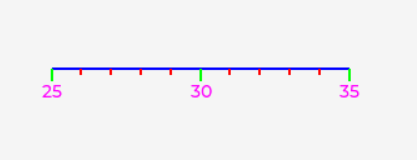
LV_PART_MAINMain line — the blue line in example image.LV_PART_ITEMSMinor ticks — the red minor ticks in example image.LV_PART_INDICATORMajor ticks and their labels (if enabled) — the green major ticks and pink labels in example image.
Usage¶
Mode¶
When a Scale Widget is created, it starts out in MODE
LV_SCALE_MODE_HORIZONTAL_BOTTOM. This makes the scale horizontal
with tick marks below the line. If you need it to have a different shape, orientation
or tick position, use lv_scale_set_mode(scale, mode), where mode can
be any of these values:
Setting range¶
A Scale starts its life with a default numeric range of [0..100] and a default angular range of 270. You can change these ranges with:
lv_scale_set_range(scale, min, max), and
lv_scale_set_angle_range(scale, angle_range)
where min and max will become the numeric low and high values for the Scale,
and angle_range is the angle between the low and high ends of the Scale.
Tick drawing order¶
Normally ticks and their labels are drawn first and the main line is drawn next,
giving the ticks and their labels the appearance of being underneath the main line
when there is overlap. You can reverse this sequence if you wish, making the ticks
and labels appear on top the main line, using
lv_scale_set_draw_ticks_on_top(scale, true). (This effect can be
reversed by passing false instead.)
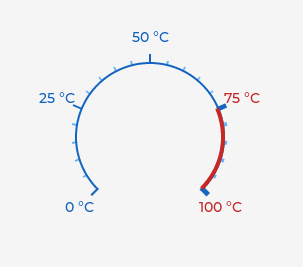
Example with with ticks and labels drawn under the main line (default):
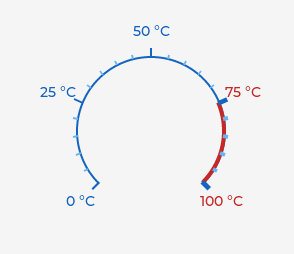
Example with ticks and labels drawn on top of the main line:
Configuring ticks¶
You configure the major and minor ticks of a Scale by calling 2 functions:
lv_scale_set_total_tick_count(scale, total_tick_count), and
lv_scale_set_major_tick_every(scale, nth_tick).
If you want labels to be drawn with the major ticks, call
lv_scale_set_label_show(scale, true). (Pass false to hide them again.)
By default, the labels shown are the numeric values of the scale at the major tick
points. Can you specify different label content by calling
lv_scale_set_text_src(scale, custom_labels) where custom_labels is an
array of string pointers. Example:
static char * custom_labels[3] = {"One", "Two", NULL};
Note that a NULL pointer is used to terminate the list.
The content of the buffers pointed to need to remain valid for the life of the Scale.
For a Scale in one of the ..._ROUND_... modes, you can optionally get it to
rotate the major-tick labels to match the rotation of the major ticks using
lv_obj_set_style_transform_rotation(scale, LV_SCALE_LABEL_ROTATE_MATCH_TICKS, LV_PART_INDICATOR).
Alternately, labels can be rotated by a fixed amount (for any Scale mode). This example rotates labels by 20 degrees: lv_obj_set_style_transform_rotation(scale, 200, LV_PART_INDICATOR).
Or both of the above can be done at the same time: lv_obj_set_style_transform_rotation(scale, LV_SCALE_LABEL_ROTATE_MATCH_TICKS + 200, LV_PART_INDICATOR).
Some labels of the Scale might be drawn upside down (to match the tick) if the Scale includes a certain angle range. If you don't want this, to automatically rotate the labels to keep them upright, an additional flag can be used. Labels that would be upside down are then rotated 180° lv_obj_set_style_transform_rotation(scale, LV_SCALE_LABEL_ROTATE_MATCH_TICKS | LV_SCALE_LABEL_ROTATE_KEEP_UPRIGHT, LV_PART_INDICATOR). Labels can also be moved a fixed distance in X and Y pixels using lv_obj_set_style_translate_x(scale, 10, LV_PART_INDICATOR).
Note
The major tick value is calculated with the lv_map API (when not setting custom labels), this calculation takes into consideration the total number of ticks and the Scale range, so the label drawn can present rounding errors when the calculated value is a floating-point value.
The length of the ticks can be configured with the length Style property on the
LV_PART_INDICATOR for major ticks and LV_PART_ITEMS
for minor ticks. Example with local Style:
lv_obj_set_style_length(scale, 5, LV_PART_INDICATOR) for major ticks
and lv_obj_set_style_length(scale, 5, LV_PART_ITEMS) for minor ticks. The ticks can be
padded in either direction (outwards or inwards) for ..._ROUND_... Scales only with:
lv_obj_set_style_radial_offset(scale, 5, LV_PART_INDICATOR) for major ticks and
lv_obj_set_style_radial_offset(scale, 5, LV_PART_ITEMS) for minor.
Using length and radial offset together allows total control of the tick position.
It is also possible to offset the labels from the major ticks (either positive or negative) using lv_obj_set_style_pad_radial(scale, 5, LV_PART_INDICATOR)
Sections¶
Sections make it possible for portions of a Scale to convey meaning by using different Style properties to draw them (colors, line thicknesses, font, etc.).
A Section represents a sub-range of the Scale, whose Styles (like Cascading Style Sheets) take precedence while drawing the PARTS (lines, arcs, ticks and labels) of the Scale that are within the range of that Section.
If a PART of a Scale is within the range of 2 or more Sections (i.e. those Sections overlap), the Style's properties belonging to the most recently added Section takes precedence over the same style properties of other Section(s) that "involve" that PART.
Creating Sections¶
A Section is created using lv_scale_add_section(scale), which returns a
pointer to a lv_scale_section_t object. This creates a Section with
range [0..0] and no Styles added to it, which ensures that Section will not be drawn
yet: it needs both a range inside the Scale's range and at least one Style added to it before it will be used in drawing the Scale.
Next, set the range using lv_scale_section_set_range(section, min, max)
where min and max are the Section's boundary values that should normally be
within the Scale's value range. (If they are only partially within the Scale's
range, the Scale will only use that portion of the Section that overlaps the Scale's
range. If a Section's range is not within the Scale's range at all, it will not be
used in drawing. That can be useful to temporarily "disable" a Section, e.g.
lv_scale_section_set_range(section, 0, -1).)
Data binding¶
To get familiar with observers, subjects, and data bindings in general, visit the Observer page.
This method of subscribing to an integer Subject affects a Section of a Scale Widget's integer minimum or maximum values directly. Note that this is a one-way binding (Subject ==> Widget) as the Scale Section's boundaries are not interactive.
It supports only integer subjects.
lv_scale_bind_section_min_value(scale, section1, &subject)
lv_scale_bind_section_max_value(scale, section1, &subject)
Styling Sections¶
You set a Section's Style properties by creating a lv_style_t object
for each "section" you want to appear different than the parent Scale. Add style
properties as is documented in Style Sheets.
You attach each lv_style_t object to each Section it will apply to using
lv_scale_section_set_style(section, PART, style_pointer), where:
style_pointershould point to the contents of a global or static variable (can be dynamically-allocated), since it needs to remain valid through the life of the Scale; andPARTindicates which single PART of the parent Scale it will apply to, namelyLV_PART_MAIN,LV_PART_ITEMSorLV_PART_INDICATOR.
Unlike adding normal styles to Widgets, you cannot combine PARTs by bit-wise OR-ing the PART values together to get the style to apply to more than one part. However, you can do something like this to accomplish the same thing:
static lv_style_t  tick_style;
lv_style_init(&tick_style);
lv_style_set_line_color(&tick_style, lv_palette_darken(LV_PALETTE_RED, 3));
lv_scale_section_set_style(section, LV_PART_ITEMS, &tick_style);
lv_scale_section_set_style(section, LV_PART_INDICATOR, &tick_style);
to get that one Style object to apply to both major and minor ticks.
lv_style_t objects can be shared among Sections and among PARTs, but
unlike normal Styles added to a Widget, a Section can only have 1 style per PART.
Thus, doing this:
lv_scale_section_set_style(section, LV_PART_INDICATOR, &tick_style_1);
lv_scale_section_set_style(section, LV_PART_INDICATOR, &tick_style_2);
replaces tick_style_1 with tick_style_2 for part
LV_PART_INDICATOR rather than adding to it.
Useful Style Properties for Sections¶
The Style properties that are used during Scale drawing (and are thus useful) are:
For main line when it is a straight line (
LV_PART_MAIN):- LV_STYLE_LINE_WIDTH:
- LV_STYLE_LINE_COLOR:
- LV_STYLE_LINE_OPA:
For main line when it is an arc (
LV_PART_MAIN):- LV_STYLE_ARC_WIDTH:
- LV_STYLE_ARC_COLOR:
- LV_STYLE_ARC_OPA:
- LV_STYLE_ARC_ROUNDED:
- LV_STYLE_ARC_IMAGE_SRC:
For tick lines (
LV_PART_ITEMSandLV_PART_INDICATOR):- LV_STYLE_LINE_WIDTH:
- LV_STYLE_LINE_COLOR:
- LV_STYLE_LINE_OPA:
For labels on major ticks (
LV_PART_INDICATOR)- LV_STYLE_TEXT_COLOR:
- LV_STYLE_TEXT_OPA:
- LV_STYLE_TEXT_LETTER_SPACE:
- LV_STYLE_TEXT_FONT:
Needles¶
Needles are used to indicate a specific value for ..._ROUND_... Scales only.
They can be lines or images and can be customized in terms of length, color, and
other properties.
Creating Needles¶
Create a lv_line or a lv_image Widget and then attach it to the Scale as a needle with the appropriate function:
lv_scale_set_line_needle_value(scale, needle_line, needle_length, value)
lv_scale_set_image_needle_value(scale, needle_img, value)
Data binding¶
To get familiar with observers, subjects, and data bindings in general, visit the Observer page.
This method of subscribing to an integer Subject affects the needle value of a Scale Widget directly. Note that this is a one-way binding (Subject ==> Widget) so when the subject changes, the Scale's needle will be updated too.
It supports only integer subjects.
lv_scale_bind_line_needle_value(scale, needle_line, needle_length, &subject)
lv_scale_bind_image_needle_value(scale, needle_img, &subject)
Events¶
No special events are sent by Scale Widgets.
In LV_EVENT_DRAW_TASK_ADDED events, a major or minor line
draw descriptor's members id1 and id2 will be the tick index and
tick value, respectively. If the part is LV_PART_INDICATOR,
it is a major tick. If the part is LV_PART_ITEMS it is a
minor tick.
Keys¶
No Keys are processed by Scale Widgets.
Further Reading
Learn more about Keys.
Examples¶
A simple horizontal scale¶
C code
View on GitHub#include "../../lv_examples.h"
#if LV_USE_SCALE && LV_BUILD_EXAMPLES
/**
* @title Horizontal scale with labels
* @brief Place a bottom-labelled horizontal scale across 80% of the screen.
*
* A scale is created with `LV_SCALE_MODE_HORIZONTAL_BOTTOM`, sized to
* 80% width and 100 px height, and centered. It has 31 ticks with every
* fifth promoted to a major tick, minor ticks 5 px long and major ticks
* 10 px long, and a value range from 10 to 40.
*/
void lv_example_scale_1(void)
{
lv_obj_t * scale = lv_scale_create(lv_screen_active());
lv_obj_set_size(scale, lv_pct(80), 100);
lv_scale_set_mode(scale, LV_SCALE_MODE_HORIZONTAL_BOTTOM);
lv_obj_center(scale);
lv_scale_set_label_show(scale, true);
lv_scale_set_total_tick_count(scale, 31);
lv_scale_set_major_tick_every(scale, 5);
lv_obj_set_style_length(scale, 5, LV_PART_ITEMS);
lv_obj_set_style_length(scale, 10, LV_PART_INDICATOR);
lv_scale_set_range(scale, 10, 40);
}
#endif
An vertical scale with section and custom styling¶
C code
View on GitHub#include "../../lv_examples.h"
#if LV_USE_SCALE && LV_BUILD_EXAMPLES
/**
* @title Vertical scale with red upper band
* @brief Celsius-labelled right-side vertical scale turning red above 75.
*
* A 60 by 200 scale uses `LV_SCALE_MODE_VERTICAL_RIGHT` with 21 ticks
* (major every fifth) over the range 0 to 100 and a custom label array
* (`0 °C` through `100 °C`). Blue styles are applied to
* `LV_PART_MAIN`, `LV_PART_INDICATOR`, and `LV_PART_ITEMS`, and a red
* section covering 75 to 100 overrides those styles via
* `lv_scale_add_section`. A translucent blue-grey background rounds out
* the widget with padding and corner radius.
*/
void lv_example_scale_2(void)
{
lv_obj_t * scale = lv_scale_create(lv_screen_active());
lv_obj_set_size(scale, 60, 200);
lv_scale_set_label_show(scale, true);
lv_scale_set_mode(scale, LV_SCALE_MODE_VERTICAL_RIGHT);
lv_obj_center(scale);
lv_scale_set_total_tick_count(scale, 21);
lv_scale_set_major_tick_every(scale, 5);
lv_obj_set_style_length(scale, 10, LV_PART_INDICATOR);
lv_obj_set_style_length(scale, 5, LV_PART_ITEMS);
lv_scale_set_range(scale, 0, 100);
static const char * custom_labels[] = {"0 °C", "25 °C", "50 °C", "75 °C", "100 °C", NULL};
lv_scale_set_text_src(scale, custom_labels);
static lv_style_t indicator_style;
lv_style_init(&indicator_style);
/* Label style properties */
lv_style_set_text_font(&indicator_style, LV_FONT_DEFAULT);
lv_style_set_text_color(&indicator_style, lv_palette_darken(LV_PALETTE_BLUE, 3));
/* Major tick properties */
lv_style_set_line_color(&indicator_style, lv_palette_darken(LV_PALETTE_BLUE, 3));
lv_style_set_width(&indicator_style, 10U); /*Tick length*/
lv_style_set_line_width(&indicator_style, 2U); /*Tick width*/
lv_obj_add_style(scale, &indicator_style, LV_PART_INDICATOR);
static lv_style_t minor_ticks_style;
lv_style_init(&minor_ticks_style);
lv_style_set_line_color(&minor_ticks_style, lv_palette_lighten(LV_PALETTE_BLUE, 2));
lv_style_set_width(&minor_ticks_style, 5U); /*Tick length*/
lv_style_set_line_width(&minor_ticks_style, 2U); /*Tick width*/
lv_obj_add_style(scale, &minor_ticks_style, LV_PART_ITEMS);
static lv_style_t main_line_style;
lv_style_init(&main_line_style);
/* Main line properties */
lv_style_set_line_color(&main_line_style, lv_palette_darken(LV_PALETTE_BLUE, 3));
lv_style_set_line_width(&main_line_style, 2U); // Tick width
lv_obj_add_style(scale, &main_line_style, LV_PART_MAIN);
/* Add a section */
static lv_style_t section_minor_tick_style;
static lv_style_t section_label_style;
static lv_style_t section_main_line_style;
lv_style_init(§ion_label_style);
lv_style_init(§ion_minor_tick_style);
lv_style_init(§ion_main_line_style);
/* Label style properties */
lv_style_set_text_font(§ion_label_style, LV_FONT_DEFAULT);
lv_style_set_text_color(§ion_label_style, lv_palette_darken(LV_PALETTE_RED, 3));
lv_style_set_line_color(§ion_label_style, lv_palette_darken(LV_PALETTE_RED, 3));
lv_style_set_line_width(§ion_label_style, 5U); /*Tick width*/
lv_style_set_line_color(§ion_minor_tick_style, lv_palette_lighten(LV_PALETTE_RED, 2));
lv_style_set_line_width(§ion_minor_tick_style, 4U); /*Tick width*/
/* Main line properties */
lv_style_set_line_color(§ion_main_line_style, lv_palette_darken(LV_PALETTE_RED, 3));
lv_style_set_line_width(§ion_main_line_style, 4U); /*Tick width*/
/* Configure section styles */
lv_scale_section_t * section = lv_scale_add_section(scale);
lv_scale_set_section_range(scale, section, 75, 100);
lv_scale_set_section_style_indicator(scale, section, §ion_label_style);
lv_scale_set_section_style_items(scale, section, §ion_minor_tick_style);
lv_scale_set_section_style_main(scale, section, §ion_main_line_style);
lv_obj_set_style_bg_color(scale, lv_palette_main(LV_PALETTE_BLUE_GREY), 0);
lv_obj_set_style_bg_opa(scale, LV_OPA_50, 0);
lv_obj_set_style_pad_left(scale, 8, 0);
lv_obj_set_style_radius(scale, 8, 0);
lv_obj_set_style_pad_ver(scale, 20, 0);
}
#endif
A simple round scale¶
C code
View on GitHub#include "../../lv_examples.h"
#if LV_USE_SCALE && LV_BUILD_EXAMPLES
LV_IMAGE_DECLARE(img_hand);
static lv_obj_t * needle_line;
static lv_obj_t * needle_img;
static void set_needle_line_value(void * obj, int32_t v)
{
lv_scale_set_line_needle_value((lv_obj_t *)obj, needle_line, 60, v);
}
static void set_needle_img_value(void * obj, int32_t v)
{
lv_scale_set_image_needle_value((lv_obj_t *)obj, needle_img, v);
}
/**
* @title Round scales with animated needles
* @brief Two round inner scales driven by looping line and image needles.
*
* Two 150 by 150 scales use `LV_SCALE_MODE_ROUND_INNER` with a 270
* degree range rotated to 135 degrees, 31 ticks, and the range 10 to
* 40. The left scale attaches an `lv_line` needle driven by
* `lv_scale_set_line_needle_value`; the right one attaches an
* `lv_image` needle (`img_hand`) driven by
* `lv_scale_set_image_needle_value`. Both needles animate between 10
* and 40 on an infinite 1000 ms forward and 1000 ms reverse loop.
*/
void lv_example_scale_3(void)
{
lv_obj_t * scale_line = lv_scale_create(lv_screen_active());
lv_obj_set_size(scale_line, 150, 150);
lv_scale_set_mode(scale_line, LV_SCALE_MODE_ROUND_INNER);
lv_obj_set_style_bg_opa(scale_line, LV_OPA_COVER, 0);
lv_obj_set_style_bg_color(scale_line, lv_palette_lighten(LV_PALETTE_RED, 5), 0);
lv_obj_set_style_radius(scale_line, LV_RADIUS_CIRCLE, 0);
lv_obj_set_style_clip_corner(scale_line, true, 0);
lv_obj_align(scale_line, LV_ALIGN_LEFT_MID, LV_PCT(2), 0);
lv_scale_set_label_show(scale_line, true);
lv_scale_set_total_tick_count(scale_line, 31);
lv_scale_set_major_tick_every(scale_line, 5);
lv_obj_set_style_length(scale_line, 5, LV_PART_ITEMS);
lv_obj_set_style_length(scale_line, 10, LV_PART_INDICATOR);
lv_scale_set_range(scale_line, 10, 40);
lv_scale_set_angle_range(scale_line, 270);
lv_scale_set_rotation(scale_line, 135);
needle_line = lv_line_create(scale_line);
lv_obj_set_style_line_width(needle_line, 6, LV_PART_MAIN);
lv_obj_set_style_line_rounded(needle_line, true, LV_PART_MAIN);
lv_anim_t anim_scale_line;
lv_anim_init(&anim_scale_line);
lv_anim_set_var(&anim_scale_line, scale_line);
lv_anim_set_exec_cb(&anim_scale_line, set_needle_line_value);
lv_anim_set_duration(&anim_scale_line, 1000);
lv_anim_set_repeat_count(&anim_scale_line, LV_ANIM_REPEAT_INFINITE);
lv_anim_set_reverse_duration(&anim_scale_line, 1000);
lv_anim_set_values(&anim_scale_line, 10, 40);
lv_anim_start(&anim_scale_line);
lv_obj_t * scale_img = lv_scale_create(lv_screen_active());
lv_obj_set_size(scale_img, 150, 150);
lv_scale_set_mode(scale_img, LV_SCALE_MODE_ROUND_INNER);
lv_obj_set_style_bg_opa(scale_img, LV_OPA_COVER, 0);
lv_obj_set_style_bg_color(scale_img, lv_palette_lighten(LV_PALETTE_RED, 5), 0);
lv_obj_set_style_radius(scale_img, LV_RADIUS_CIRCLE, 0);
lv_obj_set_style_clip_corner(scale_img, true, 0);
lv_obj_align(scale_img, LV_ALIGN_RIGHT_MID, LV_PCT(-2), 0);
lv_scale_set_label_show(scale_img, true);
lv_scale_set_total_tick_count(scale_img, 31);
lv_scale_set_major_tick_every(scale_img, 5);
lv_obj_set_style_length(scale_img, 5, LV_PART_ITEMS);
lv_obj_set_style_length(scale_img, 10, LV_PART_INDICATOR);
lv_scale_set_range(scale_img, 10, 40);
lv_scale_set_angle_range(scale_img, 270);
lv_scale_set_rotation(scale_img, 135);
/* image must point to the right. E.g. -O------>*/
needle_img = lv_image_create(scale_img);
lv_image_set_src(needle_img, &img_hand);
lv_obj_align(needle_img, LV_ALIGN_CENTER, 47, -2);
lv_image_set_pivot(needle_img, 3, 4);
lv_anim_t anim_scale_img;
lv_anim_init(&anim_scale_img);
lv_anim_set_var(&anim_scale_img, scale_img);
lv_anim_set_exec_cb(&anim_scale_img, set_needle_img_value);
lv_anim_set_duration(&anim_scale_img, 1000);
lv_anim_set_repeat_count(&anim_scale_img, LV_ANIM_REPEAT_INFINITE);
lv_anim_set_reverse_duration(&anim_scale_img, 1000);
lv_anim_set_values(&anim_scale_img, 10, 40);
lv_anim_start(&anim_scale_img);
}
#endif
A round scale with section and custom styling¶
C code
View on GitHub#include "../../lv_examples.h"
#if LV_USE_SCALE && LV_BUILD_EXAMPLES
/**
* @title Round outer scale with red upper band
* @brief Celsius-labelled round outer scale turning red above 75.
*
* A 150 by 150 scale uses `LV_SCALE_MODE_ROUND_OUTER` with 21 ticks
* (major every fifth), the range 0 to 100, and a custom label array
* (`0 °C` through `100 °C`). Blue styles are applied to
* `LV_PART_MAIN` (as an arc), `LV_PART_INDICATOR`, and `LV_PART_ITEMS`;
* a section from 75 to 100 overrides those with red arc and tick
* styles via `lv_scale_add_section`.
*/
void lv_example_scale_4(void)
{
lv_obj_t * scale = lv_scale_create(lv_screen_active());
lv_obj_set_size(scale, 150, 150);
lv_scale_set_label_show(scale, true);
lv_scale_set_mode(scale, LV_SCALE_MODE_ROUND_OUTER);
lv_obj_center(scale);
lv_scale_set_total_tick_count(scale, 21);
lv_scale_set_major_tick_every(scale, 5);
lv_obj_set_style_length(scale, 5, LV_PART_ITEMS);
lv_obj_set_style_length(scale, 10, LV_PART_INDICATOR);
lv_scale_set_range(scale, 0, 100);
static const char * custom_labels[] = {"0 °C", "25 °C", "50 °C", "75 °C", "100 °C", NULL};
lv_scale_set_text_src(scale, custom_labels);
static lv_style_t indicator_style;
lv_style_init(&indicator_style);
/* Label style properties */
lv_style_set_text_font(&indicator_style, LV_FONT_DEFAULT);
lv_style_set_text_color(&indicator_style, lv_palette_darken(LV_PALETTE_BLUE, 3));
/* Major tick properties */
lv_style_set_line_color(&indicator_style, lv_palette_darken(LV_PALETTE_BLUE, 3));
lv_style_set_width(&indicator_style, 10U); /*Tick length*/
lv_style_set_line_width(&indicator_style, 2U); /*Tick width*/
lv_obj_add_style(scale, &indicator_style, LV_PART_INDICATOR);
static lv_style_t minor_ticks_style;
lv_style_init(&minor_ticks_style);
lv_style_set_line_color(&minor_ticks_style, lv_palette_lighten(LV_PALETTE_BLUE, 2));
lv_style_set_width(&minor_ticks_style, 5U); /*Tick length*/
lv_style_set_line_width(&minor_ticks_style, 2U); /*Tick width*/
lv_obj_add_style(scale, &minor_ticks_style, LV_PART_ITEMS);
static lv_style_t main_line_style;
lv_style_init(&main_line_style);
/* Main line properties */
lv_style_set_arc_color(&main_line_style, lv_palette_darken(LV_PALETTE_BLUE, 3));
lv_style_set_arc_width(&main_line_style, 2U); /*Tick width*/
lv_obj_add_style(scale, &main_line_style, LV_PART_MAIN);
/* Add a section */
static lv_style_t section_minor_tick_style;
static lv_style_t section_label_style;
static lv_style_t section_main_line_style;
lv_style_init(§ion_label_style);
lv_style_init(§ion_minor_tick_style);
lv_style_init(§ion_main_line_style);
/* Label style properties */
lv_style_set_text_font(§ion_label_style, LV_FONT_DEFAULT);
lv_style_set_text_color(§ion_label_style, lv_palette_darken(LV_PALETTE_RED, 3));
lv_style_set_line_color(§ion_label_style, lv_palette_darken(LV_PALETTE_RED, 3));
lv_style_set_line_width(§ion_label_style, 5U); /*Tick width*/
lv_style_set_line_color(§ion_minor_tick_style, lv_palette_lighten(LV_PALETTE_RED, 2));
lv_style_set_line_width(§ion_minor_tick_style, 4U); /*Tick width*/
/* Main line properties */
lv_style_set_arc_color(§ion_main_line_style, lv_palette_darken(LV_PALETTE_RED, 3));
lv_style_set_arc_width(§ion_main_line_style, 4U); /*Tick width*/
/* Configure section styles */
lv_scale_section_t * section = lv_scale_add_section(scale);
lv_scale_set_section_range(scale, section, 75, 100);
lv_scale_set_section_style_indicator(scale, section, §ion_label_style);
lv_scale_set_section_style_items(scale, section, §ion_minor_tick_style);
lv_scale_set_section_style_main(scale, section, §ion_main_line_style);
}
#endif
A scale with section and custom styling¶
C code
View on GitHub#include "../../lv_examples.h"
#if LV_USE_SCALE && LV_BUILD_EXAMPLES
/**
* @title Custom labels and hex-coloured styles
* @brief Default-mode scale with two named ticks and a magenta/red/blue palette.
*
* A scale sized to half the display resolution carries 10 total ticks
* (major every fifth) across the range 25 to 35, with two custom
* labels `One` and `Two`. Styles set via `lv_color_hex` colour the main
* line blue, the minor ticks red, and the major tick labels magenta
* with green tick lines. A section from 25 to 30 overrides the
* indicator and items styles with spaced red text and blue minor
* ticks.
*/
void lv_example_scale_5(void)
{
lv_obj_t * scale = lv_scale_create(lv_screen_active());
lv_obj_set_size(scale, lv_display_get_horizontal_resolution(NULL) / 2, lv_display_get_vertical_resolution(NULL) / 2);
lv_scale_set_label_show(scale, true);
lv_scale_set_total_tick_count(scale, 10);
lv_scale_set_major_tick_every(scale, 5);
lv_obj_set_style_length(scale, 5, LV_PART_ITEMS);
lv_obj_set_style_length(scale, 10, LV_PART_INDICATOR);
lv_scale_set_range(scale, 25, 35);
static const char * custom_labels[3] = {"One", "Two", NULL};
lv_scale_set_text_src(scale, custom_labels);
static lv_style_t indicator_style;
lv_style_init(&indicator_style);
/* Label style properties */
lv_style_set_text_font(&indicator_style, LV_FONT_DEFAULT);
lv_style_set_text_color(&indicator_style, lv_color_hex(0xff00ff));
/* Major tick properties */
lv_style_set_line_color(&indicator_style, lv_color_hex(0x00ff00));
lv_style_set_width(&indicator_style, 10U); // Tick length
lv_style_set_line_width(&indicator_style, 2U); // Tick width
lv_obj_add_style(scale, &indicator_style, LV_PART_INDICATOR);
static lv_style_t minor_ticks_style;
lv_style_init(&minor_ticks_style);
lv_style_set_line_color(&minor_ticks_style, lv_color_hex(0xff0000));
lv_style_set_width(&minor_ticks_style, 5U); // Tick length
lv_style_set_line_width(&minor_ticks_style, 2U); // Tick width
lv_obj_add_style(scale, &minor_ticks_style, LV_PART_ITEMS);
static lv_style_t main_line_style;
lv_style_init(&main_line_style);
/* Main line properties */
lv_style_set_line_color(&main_line_style, lv_color_hex(0x0000ff));
lv_style_set_line_width(&main_line_style, 2U); // Tick width
lv_obj_add_style(scale, &main_line_style, LV_PART_MAIN);
lv_obj_center(scale);
/* Add a section */
static lv_style_t section_minor_tick_style;
static lv_style_t section_label_style;
lv_style_init(§ion_label_style);
lv_style_init(§ion_minor_tick_style);
/* Label style properties */
lv_style_set_text_font(§ion_label_style, LV_FONT_DEFAULT);
lv_style_set_text_color(§ion_label_style, lv_color_hex(0xff0000));
lv_style_set_text_letter_space(§ion_label_style, 10);
lv_style_set_text_opa(§ion_label_style, LV_OPA_50);
lv_style_set_line_color(§ion_label_style, lv_color_hex(0xff0000));
// lv_style_set_width(§ion_label_style, 20U); // Tick length
lv_style_set_line_width(§ion_label_style, 5U); // Tick width
lv_style_set_line_color(§ion_minor_tick_style, lv_color_hex(0x0000ff));
// lv_style_set_width(§ion_label_style, 20U); // Tick length
lv_style_set_line_width(§ion_minor_tick_style, 4U); // Tick width
/* Configure section styles */
lv_scale_section_t * section = lv_scale_add_section(scale);
lv_scale_set_section_range(scale, section, 25, 30);
lv_scale_set_section_style_indicator(scale, section, §ion_label_style);
lv_scale_set_section_style_items(scale, section, §ion_minor_tick_style);
}
#endif
A round scale with multiple needles, resembling a clock¶
C code
View on GitHub#include "../../lv_examples.h"
#if LV_USE_SCALE && LV_BUILD_EXAMPLES
#if LV_USE_FLOAT
#define my_PRIprecise "f"
#else
#define my_PRIprecise LV_PRId32
#endif
static lv_obj_t * scale;
static lv_obj_t * minute_hand;
static lv_obj_t * hour_hand;
static lv_point_precise_t minute_hand_points[2];
static int32_t hour;
static int32_t minute;
static void timer_cb(lv_timer_t * timer)
{
LV_UNUSED(timer);
minute++;
if(minute > 59) {
minute = 0;
hour++;
if(hour > 11) {
hour = 0;
}
}
/**
* the scale will store the needle line points in the existing
* point array if one was set with `lv_line_set_points_mutable`.
* Otherwise, it will allocate the needle line points.
*/
/* the scale will store the minute hand line points in `minute_hand_points` */
lv_scale_set_line_needle_value(scale, minute_hand, 60, minute);
/* log the points that were stored in the array */
LV_LOG_USER(
"minute hand points - "
"0: (%" my_PRIprecise ", %" my_PRIprecise "), "
"1: (%" my_PRIprecise ", %" my_PRIprecise ")",
minute_hand_points[0].x, minute_hand_points[0].y,
minute_hand_points[1].x, minute_hand_points[1].y
);
/* the scale will allocate the hour hand line points */
lv_scale_set_line_needle_value(scale, hour_hand, 40, hour * 5 + (minute / 12));
}
/**
* @title Analog clock face with two hands
* @brief Round inner scale that advances minute and hour hands on a timer.
*
* A 150 by 150 scale uses `LV_SCALE_MODE_ROUND_INNER` with a 360
* degree range rotated to 270 degrees, 61 ticks (major every fifth),
* and hour labels `12` through `11`. Two `lv_line` hands are added:
* the white minute hand stores its points in a caller-owned buffer via
* `lv_line_set_points_mutable`, while the red hour hand lets the scale
* allocate points internally. A 250 ms `lv_timer` advances the clock
* by one minute per tick, re-positioning both hands with
* `lv_scale_set_line_needle_value`.
*/
void lv_example_scale_6(void)
{
scale = lv_scale_create(lv_screen_active());
lv_obj_set_size(scale, 150, 150);
lv_scale_set_mode(scale, LV_SCALE_MODE_ROUND_INNER);
lv_obj_set_style_bg_opa(scale, LV_OPA_60, 0);
lv_obj_set_style_bg_color(scale, lv_color_black(), 0);
lv_obj_set_style_radius(scale, LV_RADIUS_CIRCLE, 0);
lv_obj_set_style_clip_corner(scale, true, 0);
lv_obj_center(scale);
lv_scale_set_label_show(scale, true);
lv_scale_set_total_tick_count(scale, 61);
lv_scale_set_major_tick_every(scale, 5);
static const char * hour_ticks[] = {"12", "1", "2", "3", "4", "5", "6", "7", "8", "9", "10", "11", NULL};
lv_scale_set_text_src(scale, hour_ticks);
static lv_style_t indicator_style;
lv_style_init(&indicator_style);
/* Label style properties */
lv_style_set_text_font(&indicator_style, LV_FONT_DEFAULT);
lv_style_set_text_color(&indicator_style, lv_palette_main(LV_PALETTE_YELLOW));
/* Major tick properties */
lv_style_set_line_color(&indicator_style, lv_palette_main(LV_PALETTE_YELLOW));
lv_style_set_length(&indicator_style, 8); /* tick length */
lv_style_set_line_width(&indicator_style, 2); /* tick width */
lv_obj_add_style(scale, &indicator_style, LV_PART_INDICATOR);
/* Minor tick properties */
static lv_style_t minor_ticks_style;
lv_style_init(&minor_ticks_style);
lv_style_set_line_color(&minor_ticks_style, lv_palette_main(LV_PALETTE_YELLOW));
lv_style_set_length(&minor_ticks_style, 6); /* tick length */
lv_style_set_line_width(&minor_ticks_style, 2); /* tick width */
lv_obj_add_style(scale, &minor_ticks_style, LV_PART_ITEMS);
/* Main line properties */
static lv_style_t main_line_style;
lv_style_init(&main_line_style);
lv_style_set_arc_color(&main_line_style, lv_color_black());
lv_style_set_arc_width(&main_line_style, 5);
lv_obj_add_style(scale, &main_line_style, LV_PART_MAIN);
lv_scale_set_range(scale, 0, 60);
lv_scale_set_angle_range(scale, 360);
lv_scale_set_rotation(scale, 270);
minute_hand = lv_line_create(scale);
lv_line_set_points_mutable(minute_hand, minute_hand_points, 2);
lv_obj_set_style_line_width(minute_hand, 3, 0);
lv_obj_set_style_line_rounded(minute_hand, true, 0);
lv_obj_set_style_line_color(minute_hand, lv_color_white(), 0);
hour_hand = lv_line_create(scale);
lv_obj_set_style_line_width(hour_hand, 5, 0);
lv_obj_set_style_line_rounded(hour_hand, true, 0);
lv_obj_set_style_line_color(hour_hand, lv_palette_main(LV_PALETTE_RED), 0);
hour = 11;
minute = 5;
lv_timer_t * timer = lv_timer_create(timer_cb, 250, NULL);
lv_timer_ready(timer);
}
#endif
Customizing scale major tick label color with LV_EVENT_DRAW_TASK_ADDED event¶
C code
View on GitHub#include "../../lv_examples.h"
#if LV_USE_SCALE && LV_BUILD_EXAMPLES
#include "../../../lvgl_private.h" /*To expose the fields of lv_draw_task_t*/
static void draw_event_cb(lv_event_t * e)
{
lv_obj_t * obj = lv_event_get_target_obj(e);
lv_draw_task_t * draw_task = lv_event_get_draw_task(e);
lv_draw_dsc_base_t * base_dsc = (lv_draw_dsc_base_t *)lv_draw_task_get_draw_dsc(draw_task);
lv_draw_label_dsc_t * label_draw_dsc = lv_draw_task_get_label_dsc(draw_task);
if(base_dsc->part == LV_PART_INDICATOR) {
if(label_draw_dsc) {
const lv_color_t color_idx[7] = {
lv_palette_main(LV_PALETTE_RED),
lv_palette_main(LV_PALETTE_ORANGE),
lv_palette_main(LV_PALETTE_YELLOW),
lv_palette_main(LV_PALETTE_GREEN),
lv_palette_main(LV_PALETTE_CYAN),
lv_palette_main(LV_PALETTE_BLUE),
lv_palette_main(LV_PALETTE_PURPLE),
};
uint32_t major_tick = lv_scale_get_major_tick_every(obj);
label_draw_dsc->color = color_idx[base_dsc->id1 / major_tick];
/*Free the previously allocated text if needed*/
if(label_draw_dsc->text_local) lv_free((void *)label_draw_dsc->text);
/*Malloc the text and set text_local as 1 to make LVGL automatically free the text.
* (Local texts are malloc'd internally by LVGL. Mimic this behavior here too)*/
char tmp_buffer[20] = {0}; /* Big enough buffer */
lv_snprintf(tmp_buffer, sizeof(tmp_buffer), "%.1f", (double)base_dsc->id2);
label_draw_dsc->text = lv_strdup(tmp_buffer);
label_draw_dsc->text_local = 1;
lv_point_t size;
lv_text_get_size(&size, label_draw_dsc->text, label_draw_dsc->font, 0, 0, 1000, LV_TEXT_FLAG_NONE);
int32_t new_w = size.x;
int32_t old_w = lv_area_get_width(&draw_task->area);
/* Distribute the new size equally on both sides */
draw_task->area.x1 -= (new_w - old_w) / 2;
draw_task->area.x2 += ((new_w - old_w) + 1) / 2; /* +1 for rounding */
}
}
}
/**
* @title Rainbow major-tick labels via draw task
* @brief Recolour and reformat scale labels during `LV_EVENT_DRAW_TASK_ADDED`.
*
* A horizontal-bottom scale (80% width, 100 px tall, 31 ticks, range
* 10 to 40) enables `LV_OBJ_FLAG_SEND_DRAW_TASK_EVENTS` and subscribes
* to `LV_EVENT_DRAW_TASK_ADDED`. The callback inspects each draw
* task targeting `LV_PART_INDICATOR`, rewrites the label text to a
* one-decimal value formatted from `id2`, picks one of seven palette
* colours by tick index, and expands the draw area to fit the new
* text width.
*/
void lv_example_scale_7(void)
{
lv_obj_t * scale = lv_scale_create(lv_screen_active());
lv_obj_set_size(scale, lv_pct(80), 100);
lv_scale_set_mode(scale, LV_SCALE_MODE_HORIZONTAL_BOTTOM);
lv_obj_center(scale);
lv_scale_set_label_show(scale, true);
lv_scale_set_total_tick_count(scale, 31);
lv_scale_set_major_tick_every(scale, 5);
lv_obj_set_style_length(scale, 5, LV_PART_ITEMS);
lv_obj_set_style_length(scale, 10, LV_PART_INDICATOR);
lv_scale_set_range(scale, 10, 40);
lv_obj_add_event_cb(scale, draw_event_cb, LV_EVENT_DRAW_TASK_ADDED, NULL);
lv_obj_add_flag(scale, LV_OBJ_FLAG_SEND_DRAW_TASK_EVENTS);
}
#endif
A round scale with labels rotated and translated¶
C code
View on GitHub#include "../../lv_examples.h"
#if LV_USE_SCALE && LV_BUILD_EXAMPLES
/**
* @title Round scale with rotated upright labels
* @brief Round inner scale whose labels follow ticks while staying upright.
*
* A 150 by 150 scale uses `LV_SCALE_MODE_ROUND_INNER` with a 270
* degree range rotated to 135 degrees, 31 ticks over the range 10 to
* 40. The indicator part applies
* `LV_SCALE_LABEL_ROTATE_MATCH_TICKS | LV_SCALE_LABEL_ROTATE_KEEP_UPRIGHT`,
* a 10 px horizontal translate, a 15 px tick length, and a 10 px
* radial offset. Minor ticks get a 10 px length, a 5 px radial offset,
* and 50% line opacity. A static `lv_line` needle is anchored at
* value 33.
*/
void lv_example_scale_8(void)
{
lv_obj_t * scale_line = lv_scale_create(lv_screen_active());
lv_obj_set_size(scale_line, 150, 150);
lv_scale_set_mode(scale_line, LV_SCALE_MODE_ROUND_INNER);
lv_obj_set_style_bg_opa(scale_line, LV_OPA_COVER, 0);
lv_obj_set_style_bg_color(scale_line, lv_palette_lighten(LV_PALETTE_RED, 5), 0);
lv_obj_set_style_radius(scale_line, LV_RADIUS_CIRCLE, 0);
lv_obj_align(scale_line, LV_ALIGN_LEFT_MID, LV_PCT(2), 0);
/*Set the texts' and major ticks' style (make the texts rotated)*/
lv_obj_set_style_transform_rotation(scale_line, LV_SCALE_LABEL_ROTATE_MATCH_TICKS | LV_SCALE_LABEL_ROTATE_KEEP_UPRIGHT,
LV_PART_INDICATOR);
lv_obj_set_style_translate_x(scale_line, 10, LV_PART_INDICATOR);
lv_obj_set_style_length(scale_line, 15, LV_PART_INDICATOR);
lv_obj_set_style_radial_offset(scale_line, 10, LV_PART_INDICATOR);
/*Set the style of the minor ticks*/
lv_obj_set_style_length(scale_line, 10, LV_PART_ITEMS);
lv_obj_set_style_radial_offset(scale_line, 5, LV_PART_ITEMS);
lv_obj_set_style_line_opa(scale_line, LV_OPA_50, LV_PART_ITEMS);
lv_scale_set_label_show(scale_line, true);
lv_scale_set_total_tick_count(scale_line, 31);
lv_scale_set_major_tick_every(scale_line, 5);
lv_scale_set_range(scale_line, 10, 40);
lv_scale_set_angle_range(scale_line, 270);
lv_scale_set_rotation(scale_line, 135);
lv_obj_t * needle_line = lv_line_create(scale_line);
lv_obj_set_style_line_width(needle_line, 3, LV_PART_MAIN);
lv_obj_set_style_line_rounded(needle_line, true, LV_PART_MAIN);
lv_scale_set_line_needle_value(scale_line, needle_line, 60, 33);
}
#endif
A horizontal scale with labels rotated and translated¶
C code
View on GitHub#include "../../lv_examples.h"
#if LV_USE_SCALE && LV_BUILD_EXAMPLES
/**
* @title Tilted major ticks on horizontal scale
* @brief Horizontal scale whose major ticks rotate 45 degrees with a translate offset.
*
* A 200 by 100 horizontal-bottom scale carries 31 ticks (major every
* fifth) over the range 10 to 40. The indicator part receives a
* transform rotation of 450 (45.0 degrees), a 30 px tick length, and a
* 5 px x-translate, leaning each major tick and its label away from
* vertical. Minor ticks keep a 5 px length and straight orientation.
*/
void lv_example_scale_9(void)
{
lv_obj_t * scale = lv_scale_create(lv_screen_active());
lv_obj_set_size(scale, 200, 100);
lv_scale_set_mode(scale, LV_SCALE_MODE_HORIZONTAL_BOTTOM);
lv_obj_center(scale);
lv_scale_set_label_show(scale, true);
lv_obj_set_style_transform_rotation(scale, 450, LV_PART_INDICATOR);
lv_obj_set_style_length(scale, 30, LV_PART_INDICATOR);
lv_obj_set_style_translate_x(scale, 5, LV_PART_INDICATOR);
lv_scale_set_total_tick_count(scale, 31);
lv_scale_set_major_tick_every(scale, 5);
lv_obj_set_style_length(scale, 5, LV_PART_ITEMS);
lv_obj_set_style_length(scale, 10, LV_PART_INDICATOR);
lv_scale_set_range(scale, 10, 40);
}
#endif
A round scale style simulating a Heart Rate monitor¶
C code
View on GitHub#include "../../lv_examples.h"
#if LV_USE_SCALE && LV_BUILD_EXAMPLES && LV_FONT_MONTSERRAT_40 && LV_FONT_MONTSERRAT_18
static int32_t hr_value = 98;
static int8_t hr_step = 1;
static lv_obj_t * needle_line = NULL;
static lv_obj_t * hr_value_label = NULL;
static lv_obj_t * bpm_label = NULL;
static lv_obj_t * scale = NULL;
typedef struct {
lv_style_t items;
lv_style_t indicator;
lv_style_t main;
} section_styles_t;
static section_styles_t zone1_styles;
static section_styles_t zone2_styles;
static section_styles_t zone3_styles;
static section_styles_t zone4_styles;
static section_styles_t zone5_styles;
static lv_color_t get_hr_zone_color(int32_t hr)
{
if(hr < 117) return lv_palette_main(LV_PALETTE_GREY); /* Zone 1 */
else if(hr < 135) return lv_palette_main(LV_PALETTE_BLUE); /* Zone 2 */
else if(hr < 158) return lv_palette_main(LV_PALETTE_GREEN); /* Zone 3 */
else if(hr < 176) return lv_palette_main(LV_PALETTE_ORANGE); /* Zone 4 */
else return lv_palette_main(LV_PALETTE_RED); /* Zone 5 */
}
static void hr_anim_timer_cb(lv_timer_t * timer)
{
LV_UNUSED(timer);
hr_value += hr_step;
if(hr_value >= 195) {
hr_value = 195;
hr_step = -1;
}
else if(hr_value <= 98) {
hr_value = 98;
hr_step = 1;
}
/* Update needle */
lv_scale_set_line_needle_value(scale, needle_line, 180, hr_value);
/* Update HR text */
lv_label_set_text_fmt(hr_value_label, "%d", hr_value);
/* Update text color based on zone */
lv_color_t zone_color = get_hr_zone_color(hr_value);
lv_obj_set_style_text_color(hr_value_label, zone_color, 0);
lv_obj_set_style_text_color(bpm_label, zone_color, 0);
}
static void init_section_styles(section_styles_t * styles, lv_color_t color)
{
lv_style_init(&styles->items);
lv_style_set_line_color(&styles->items, color);
lv_style_set_line_width(&styles->items, 0);
lv_style_init(&styles->indicator);
lv_style_set_line_color(&styles->indicator, color);
lv_style_set_line_width(&styles->indicator, 0);
lv_style_init(&styles->main);
lv_style_set_arc_color(&styles->main, color);
lv_style_set_arc_width(&styles->main, 20);
}
static void add_section(lv_obj_t * target_scale,
int32_t from,
int32_t to,
const section_styles_t * styles)
{
lv_scale_section_t * sec = lv_scale_add_section(target_scale);
lv_scale_set_section_range(target_scale, sec, from, to);
lv_scale_set_section_style_items(target_scale, sec, &styles->items);
lv_scale_set_section_style_indicator(target_scale, sec, &styles->indicator);
lv_scale_set_section_style_main(target_scale, sec, &styles->main);
}
/**
* @title Heart-rate zone gauge with animated needle
* @brief Round inner scale coloured by five heart-rate zones with a bpm readout.
*
* A 200 by 200 scale uses `LV_SCALE_MODE_ROUND_INNER` over the range
* 98 to 195 bpm with a 280 degree sweep rotated to 130 degrees and
* 15 ticks (major every third). Five sections colour the arc grey,
* blue, green, orange, and red for zones 1 through 5, and a black
* `lv_line` needle is placed with `lv_scale_set_line_needle_value`. A
* centred circular overlay holds a flex-column container with a
* Montserrat 40 bpm value and a Montserrat 18 `bpm` label. An 80 ms
* `lv_timer` sweeps the displayed heart rate between 98 and 195,
* updating the needle, the value, and the zone-matching text colour.
*/
void lv_example_scale_10(void)
{
scale = lv_scale_create(lv_screen_active());
lv_obj_center(scale);
lv_obj_set_size(scale, 200, 200);
lv_scale_set_mode(scale, LV_SCALE_MODE_ROUND_INNER);
lv_scale_set_range(scale, 98, 195);
lv_scale_set_total_tick_count(scale, 15);
lv_scale_set_major_tick_every(scale, 3);
lv_scale_set_angle_range(scale, 280);
lv_scale_set_rotation(scale, 130);
lv_scale_set_label_show(scale, false);
lv_obj_set_style_length(scale, 6, LV_PART_ITEMS);
lv_obj_set_style_length(scale, 10, LV_PART_INDICATOR);
lv_obj_set_style_arc_width(scale, 0, LV_PART_MAIN);
/* Zone 1: (Grey) */
init_section_styles(&zone1_styles, lv_palette_main(LV_PALETTE_GREY));
add_section(scale, 98, 117, &zone1_styles);
/* Zone 2: (Blue) */
init_section_styles(&zone2_styles, lv_palette_main(LV_PALETTE_BLUE));
add_section(scale, 117, 135, &zone2_styles);
/* Zone 3: (Green) */
init_section_styles(&zone3_styles, lv_palette_main(LV_PALETTE_GREEN));
add_section(scale, 135, 158, &zone3_styles);
/* Zone 4: (Orange) */
init_section_styles(&zone4_styles, lv_palette_main(LV_PALETTE_ORANGE));
add_section(scale, 158, 176, &zone4_styles);
/* Zone 5: (Red) */
init_section_styles(&zone5_styles, lv_palette_main(LV_PALETTE_RED));
add_section(scale, 176, 195, &zone5_styles);
needle_line = lv_line_create(scale);
/* Optional styling */
lv_obj_set_style_line_color(needle_line, lv_color_black(), LV_PART_MAIN);
lv_obj_set_style_line_width(needle_line, 12, LV_PART_MAIN);
lv_obj_set_style_length(needle_line, 20, LV_PART_MAIN);
lv_obj_set_style_line_rounded(needle_line, false, LV_PART_MAIN);
lv_obj_set_style_pad_right(needle_line, 50, LV_PART_MAIN);
int32_t current_hr = 145;
lv_scale_set_line_needle_value(scale, needle_line, 50, current_hr);
lv_obj_t * circle = lv_obj_create(lv_screen_active());
lv_obj_set_size(circle, 130, 130);
lv_obj_center(circle);
lv_obj_set_style_radius(circle, LV_RADIUS_CIRCLE, 0);
lv_obj_set_style_bg_color(circle, lv_obj_get_style_bg_color(lv_screen_active(), LV_PART_MAIN), 0);
lv_obj_set_style_bg_opa(circle, LV_OPA_COVER, 0);
lv_obj_set_style_border_width(circle, 0, LV_PART_MAIN);
lv_obj_t * hr_container = lv_obj_create(circle);
lv_obj_center(hr_container);
lv_obj_set_size(hr_container, lv_pct(100), LV_SIZE_CONTENT);
lv_obj_set_style_bg_opa(hr_container, LV_OPA_TRANSP, 0);
lv_obj_set_style_border_width(hr_container, 0, 0);
lv_obj_set_layout(hr_container, LV_LAYOUT_FLEX);
lv_obj_set_flex_flow(hr_container, LV_FLEX_FLOW_COLUMN);
lv_obj_set_style_pad_all(hr_container, 0, LV_PART_MAIN);
lv_obj_set_style_pad_row(hr_container, 0, 0);
lv_obj_set_flex_align(hr_container, LV_FLEX_ALIGN_CENTER, LV_FLEX_ALIGN_CENTER, LV_FLEX_ALIGN_CENTER);
hr_value_label = lv_label_create(hr_container);
lv_label_set_text_fmt(hr_value_label, "%d", current_hr);
lv_obj_set_style_text_font(hr_value_label, &lv_font_montserrat_40, 0);
lv_obj_set_style_text_align(hr_value_label, LV_TEXT_ALIGN_CENTER, 0);
bpm_label = lv_label_create(hr_container);
lv_label_set_text(bpm_label, "bpm");
lv_obj_set_style_text_font(bpm_label, &lv_font_montserrat_18, 0);
lv_obj_set_style_text_align(bpm_label, LV_TEXT_ALIGN_CENTER, 0);
lv_color_t zone_color = get_hr_zone_color(current_hr);
lv_obj_set_style_text_color(hr_value_label, zone_color, 0);
lv_obj_set_style_text_color(bpm_label, zone_color, 0);
lv_timer_create(hr_anim_timer_cb, 80, NULL);
}
#endif
A round scale style simulating a sunset/sunrise widget¶
C code
View on GitHub#include "../../lv_examples.h"
#if LV_USE_SCALE && LV_BUILD_EXAMPLES && LV_FONT_MONTSERRAT_12 && LV_FONT_MONTSERRAT_14 && LV_FONT_MONTSERRAT_16 && LV_FONT_MONTSERRAT_20
static void label_color_cb(lv_event_t * e)
{
lv_draw_task_t * draw_task = lv_event_get_draw_task(e);
if(!draw_task) return;
lv_draw_dsc_base_t * base_dsc = (lv_draw_dsc_base_t *)lv_draw_task_get_draw_dsc(draw_task);
if(!base_dsc || base_dsc->part != LV_PART_INDICATOR) return;
lv_draw_label_dsc_t * label_dsc = lv_draw_task_get_label_dsc(draw_task);
if(!label_dsc || !label_dsc->text) return;
const char * txt = label_dsc->text;
if(lv_strcmp(txt, "06") == 0 || lv_strcmp(txt, "12") == 0 ||
lv_strcmp(txt, "18") == 0 || lv_strcmp(txt, "24") == 0) {
label_dsc->color = lv_color_white();
}
else {
label_dsc->color = lv_palette_darken(LV_PALETTE_GREY, 1);
}
}
/**
* @title 24-hour day and night dial
* @brief Round outer scale split into coloured day and night arcs with sunrise and sunset text.
*
* A 210 by 210 dark grey container hosts a 150 by 150
* `LV_SCALE_MODE_ROUND_OUTER` scale over the range 0 to 24 with a
* full 360 degree sweep rotated to 105 degrees and 25 hourly ticks in
* `lv_font_montserrat_12`. Labels `01` through `24` rotate to follow
* the ticks while staying upright, and an `LV_EVENT_DRAW_TASK_ADDED`
* callback whitens the `06`, `12`, `18`, and `24` labels while
* greying the rest. Two sections colour the arc blue for 17 to 5
* (night) and dark yellow for 5 to 17 (day). Inside the container,
* a top `TODAY` heading sits above `SUNRISE 6:43` on the left and
* `SUNSET 17:37` on the right, using `lv_font_montserrat_14` through `_20`.
*/
void lv_example_scale_11(void)
{
lv_obj_t * bg = lv_obj_create(lv_screen_active());
lv_obj_set_size(bg, 210, 210);
lv_obj_center(bg);
lv_obj_set_style_radius(bg, LV_RADIUS_CIRCLE, 0);
lv_obj_set_style_bg_color(bg, lv_palette_darken(LV_PALETTE_GREY, 4), 0);
lv_obj_set_style_bg_opa(bg, LV_OPA_COVER, 0);
lv_obj_remove_flag(bg, LV_OBJ_FLAG_SCROLLABLE);
lv_obj_set_style_pad_all(bg, 0, LV_PART_MAIN);
lv_obj_t * scale = lv_scale_create(bg);
lv_obj_center(scale);
lv_obj_set_size(scale, 150, 150);
lv_obj_set_style_arc_width(scale, 5, LV_PART_MAIN);
lv_scale_set_mode(scale, LV_SCALE_MODE_ROUND_OUTER);
lv_scale_set_range(scale, 0, 24);
lv_scale_set_total_tick_count(scale, 25);
lv_scale_set_major_tick_every(scale, 1);
lv_scale_set_angle_range(scale, 360);
lv_scale_set_rotation(scale, 105);
lv_scale_set_label_show(scale, true);
lv_obj_set_style_text_font(scale, &lv_font_montserrat_12, LV_PART_INDICATOR);
lv_obj_set_style_pad_radial(scale, -6, LV_PART_INDICATOR);
/*Rotate the labels of the ticks*/
lv_obj_set_style_transform_rotation(scale, LV_SCALE_LABEL_ROTATE_MATCH_TICKS | LV_SCALE_LABEL_ROTATE_KEEP_UPRIGHT,
LV_PART_INDICATOR);
/* Style for major ticks */
static lv_style_t style_ticks;
lv_style_init(&style_ticks);
lv_style_set_line_color(&style_ticks, lv_palette_darken(LV_PALETTE_GREY, 1));
lv_style_set_line_width(&style_ticks, 2);
lv_style_set_width(&style_ticks, 10);
lv_obj_add_style(scale, &style_ticks, LV_PART_INDICATOR);
/* Style for NIGHT — blue */
static lv_style_t style_night;
lv_style_init(&style_night);
lv_style_set_arc_color(&style_night, lv_palette_main(LV_PALETTE_BLUE));
/* Style for DAY — dark yellow */
static lv_style_t style_day;
lv_style_init(&style_day);
lv_style_set_arc_color(&style_day, lv_palette_darken(LV_PALETTE_YELLOW, 3));
/* NIGHT section */
lv_scale_section_t * section_night1 = lv_scale_add_section(scale);
lv_scale_set_section_range(scale, section_night1, 17, 5);
lv_scale_set_section_style_main(scale, section_night1, &style_night);
/* DAY section */
lv_scale_section_t * section_day = lv_scale_add_section(scale);
lv_scale_set_section_range(scale, section_day, 5, 17);
lv_scale_set_section_style_main(scale, section_day, &style_day);
static const char * hour_labels[] = {
"01", "02", "03", "04", "05",
"06", "07", "08", "09", "10",
"11", "12", "13", "14", "15",
"16", "17", "18", "19", "20",
"21", "22", "23", "24",
NULL
};
lv_scale_set_text_src(scale, hour_labels);
lv_obj_add_flag(scale, LV_OBJ_FLAG_SEND_DRAW_TASK_EVENTS);
lv_obj_add_event_cb(scale, label_color_cb, LV_EVENT_DRAW_TASK_ADDED, NULL);
lv_obj_t * today = lv_label_create(bg);
lv_label_set_text(today, "TODAY");
lv_obj_set_style_text_font(today, &lv_font_montserrat_16, 0);
lv_obj_set_style_text_color(today, lv_color_white(), 0);
lv_obj_align(today, LV_ALIGN_TOP_MID, 0, 60);
lv_obj_t * sunrise_lbl = lv_label_create(bg);
lv_label_set_text(sunrise_lbl, "SUNRISE");
lv_obj_set_style_text_font(sunrise_lbl, &lv_font_montserrat_14, 0);
lv_obj_set_style_text_color(sunrise_lbl, lv_palette_main(LV_PALETTE_GREY), 0);
lv_obj_align(sunrise_lbl, LV_ALIGN_LEFT_MID, 37, -10);
lv_obj_t * sunrise_time = lv_label_create(bg);
lv_label_set_text(sunrise_time, "6:43");
lv_obj_set_style_text_font(sunrise_time, &lv_font_montserrat_20, 0);
lv_obj_set_style_text_color(sunrise_time, lv_color_white(), 0);
lv_obj_align_to(sunrise_time, sunrise_lbl, LV_ALIGN_OUT_BOTTOM_MID, 0, 2);
lv_obj_t * sunset_lbl = lv_label_create(bg);
lv_label_set_text(sunset_lbl, "SUNSET");
lv_obj_set_style_text_font(sunset_lbl, &lv_font_montserrat_14, 0);
lv_obj_set_style_text_color(sunset_lbl, lv_palette_main(LV_PALETTE_GREY), 0);
lv_obj_align(sunset_lbl, LV_ALIGN_RIGHT_MID, -37, -10);
lv_obj_t * sunset_time = lv_label_create(bg);
lv_label_set_text(sunset_time, "17:37");
lv_obj_set_style_text_font(sunset_time, &lv_font_montserrat_20, 0);
lv_obj_set_style_text_color(sunset_time, lv_color_white(), 0);
lv_obj_align_to(sunset_time, sunset_lbl, LV_ALIGN_OUT_BOTTOM_MID, 0, 2);
}
#endif
A round scale style simulating a compass¶
C code
View on GitHub#include "../../lv_examples.h"
#if LV_USE_SCALE && LV_BUILD_EXAMPLES
static lv_obj_t * scale;
static lv_obj_t * label;
static const char * heading_to_cardinal(int32_t heading)
{
/* Normalize heading to range [0, 360) */
while(heading < 0) heading += 360;
while(heading >= 360) heading -= 360;
if(heading < 23) return "N";
else if(heading < 68) return "NE";
else if(heading < 113) return "E";
else if(heading < 158) return "SE";
else if(heading < 203) return "S";
else if(heading < 248) return "SW";
else if(heading < 293) return "W";
else if(heading < 338) return "NW";
return "N";
}
static void set_heading_value(void * obj, int32_t v)
{
LV_UNUSED(obj);
lv_scale_set_rotation(scale, 270 - v);
lv_label_set_text_fmt(label, "%d°\n%s", (int)v, heading_to_cardinal(v));
}
static void draw_event_cb(lv_event_t * e)
{
lv_draw_task_t * draw_task = lv_event_get_draw_task(e);
lv_draw_dsc_base_t * base_dsc = (lv_draw_dsc_base_t *)lv_draw_task_get_draw_dsc(draw_task);
lv_draw_label_dsc_t * label_draw_dsc = lv_draw_task_get_label_dsc(draw_task);
lv_draw_line_dsc_t * line_draw_dsc = lv_draw_task_get_line_dsc(draw_task);
if(base_dsc->part == LV_PART_INDICATOR) {
if(label_draw_dsc) {
if(base_dsc->id1 == 0) {
label_draw_dsc->color = lv_palette_main(LV_PALETTE_RED);
}
}
if(line_draw_dsc) {
if(base_dsc->id1 == 60) {
line_draw_dsc->color = lv_palette_main(LV_PALETTE_RED);
}
}
}
}
/**
* @title Rotating compass with cardinal labels
* @brief Round scale rotates under a fixed arrow as its heading sweeps 0 to 360.
*
* A 200 by 200 scale uses `LV_SCALE_MODE_ROUND_INNER` over 0 to 360
* with a 360 degree sweep, 61 ticks, and custom labels alternating
* `N`, `30`, `60`, `E`, and so on. A red `LV_SYMBOL_UP` label pins
* the forward bearing at the top, and a centre label formats the
* heading as `<deg>` plus the cardinal string from
* `heading_to_cardinal`. An `LV_EVENT_DRAW_TASK_ADDED` callback paints
* the `N` label and its tick red. An infinite 5000 ms forward and
* reverse animation drives `lv_scale_set_rotation`, turning the dial
* beneath the arrow.
*/
void lv_example_scale_12(void)
{
scale = lv_scale_create(lv_screen_active());
lv_obj_set_size(scale, 200, 200);
lv_scale_set_mode(scale, LV_SCALE_MODE_ROUND_INNER);
lv_obj_set_align(scale, LV_ALIGN_CENTER);
lv_scale_set_total_tick_count(scale, 61);
lv_scale_set_major_tick_every(scale, 5);
lv_obj_set_style_length(scale, 5, LV_PART_ITEMS);
lv_obj_set_style_length(scale, 10, LV_PART_INDICATOR);
lv_obj_set_style_line_width(scale, 3, LV_PART_INDICATOR);
lv_scale_set_range(scale, 0, 360);
static const char * custom_labels[] = {"N", "30", "60", "E", "120", "150", "S", "210", "240", "W", "300", "330", NULL};
lv_scale_set_text_src(scale, custom_labels);
lv_scale_set_angle_range(scale, 360);
lv_scale_set_rotation(scale, 270);
lv_obj_add_event_cb(scale, draw_event_cb, LV_EVENT_DRAW_TASK_ADDED, NULL);
lv_obj_add_flag(scale, LV_OBJ_FLAG_SEND_DRAW_TASK_EVENTS);
label = lv_label_create(lv_screen_active());
lv_obj_set_width(label, 100);
lv_obj_set_align(label, LV_ALIGN_CENTER);
lv_label_set_text(label, "0°\nN");
lv_obj_set_style_text_align(label, LV_TEXT_ALIGN_CENTER, 0);
set_heading_value(NULL, 0);
lv_obj_t * symbol = lv_label_create(scale);
lv_obj_set_align(symbol, LV_ALIGN_TOP_MID);
lv_obj_set_y(symbol, 5);
lv_label_set_text(symbol, LV_SYMBOL_UP);
lv_obj_set_style_text_align(symbol, LV_TEXT_ALIGN_CENTER, 0);
lv_obj_set_style_text_color(symbol, lv_palette_main(LV_PALETTE_RED), 0);
lv_anim_t anim_scale;
lv_anim_init(&anim_scale);
lv_anim_set_var(&anim_scale, scale);
lv_anim_set_exec_cb(&anim_scale, set_heading_value);
lv_anim_set_duration(&anim_scale, 5000);
lv_anim_set_repeat_delay(&anim_scale, 500);
lv_anim_set_repeat_count(&anim_scale, LV_ANIM_REPEAT_INFINITE);
lv_anim_set_reverse_duration(&anim_scale, 5000);
lv_anim_set_reverse_delay(&anim_scale, 500);
lv_anim_set_values(&anim_scale, 0, 360);
lv_anim_start(&anim_scale);
}
#endif
Axis ticks and labels with scrolling on a chart¶
C code
View on GitHub#include "../../lv_examples.h"
#if LV_USE_CHART && LV_BUILD_EXAMPLES
/**
* @title Scrollable bar chart with month scale
* @brief Bar chart inside a scrollable wrapper paired with a horizontal month scale.
*
* A 200x150 container holds a transparent flex-column wrapper sized to
* 300% width so the chart scrolls horizontally. The wrapper contains a
* `LV_CHART_TYPE_BAR` chart with 12 points and two green series, plus a
* `lv_scale` in `LV_SCALE_MODE_HORIZONTAL_BOTTOM` labeled with month
* abbreviations. The scale's horizontal padding is aligned to the first
* bar using `lv_chart_get_first_point_center_offset`.
*/
void lv_example_chart_2(void)
{
/*Create a container*/
lv_obj_t * main_cont = lv_obj_create(lv_screen_active());
lv_obj_set_size(main_cont, 200, 150);
lv_obj_center(main_cont);
/*Create a transparent wrapper for the chart and the scale.
*Set a large width, to make it scrollable on the main container*/
lv_obj_t * wrapper = lv_obj_create(main_cont);
lv_obj_remove_style_all(wrapper);
lv_obj_set_size(wrapper, lv_pct(300), lv_pct(100));
lv_obj_set_flex_flow(wrapper, LV_FLEX_FLOW_COLUMN);
/*Create a chart on the wrapper
*Set it's width to 100% to fill the large wrapper*/
lv_obj_t * chart = lv_chart_create(wrapper);
lv_obj_set_width(chart, lv_pct(100));
lv_obj_set_flex_grow(chart, 1);
lv_chart_set_type(chart, LV_CHART_TYPE_BAR);
lv_chart_set_axis_range(chart, LV_CHART_AXIS_PRIMARY_Y, 0, 100);
lv_chart_set_axis_range(chart, LV_CHART_AXIS_SECONDARY_Y, 0, 400);
lv_chart_set_point_count(chart, 12);
lv_obj_set_style_radius(chart, 0, 0);
/*Create a scale also with 100% width*/
lv_obj_t * scale_bottom = lv_scale_create(wrapper);
lv_scale_set_mode(scale_bottom, LV_SCALE_MODE_HORIZONTAL_BOTTOM);
lv_obj_set_size(scale_bottom, lv_pct(100), 25);
lv_scale_set_total_tick_count(scale_bottom, 12);
lv_scale_set_major_tick_every(scale_bottom, 1);
lv_obj_set_style_pad_hor(scale_bottom, lv_chart_get_first_point_center_offset(chart), 0);
static const char * month[] = {"Jan", "Febr", "March", "Apr", "May", "Jun", "July", "Aug", "Sept", "Oct", "Nov", "Dec", NULL};
lv_scale_set_text_src(scale_bottom, month);
/*Add two data series*/
lv_chart_series_t * ser1 = lv_chart_add_series(chart, lv_palette_lighten(LV_PALETTE_GREEN, 2), LV_CHART_AXIS_PRIMARY_Y);
lv_chart_series_t * ser2 = lv_chart_add_series(chart, lv_palette_darken(LV_PALETTE_GREEN, 2), LV_CHART_AXIS_PRIMARY_Y);
/*Set the next points on 'ser1'*/
uint32_t i;
for(i = 0; i < 12; i++) {
lv_chart_set_next_value(chart, ser1, (int32_t)lv_rand(10, 60));
lv_chart_set_next_value(chart, ser2, (int32_t)lv_rand(50, 90));
}
lv_chart_refresh(chart); /*Required after direct set*/
}
#endif